A slow charge looks like a dying battery. It can just as easily be an underpowered adapter, a charging port packed with pocket lint, or a phone working hard while it sits on the cable. Check those three before you assume the battery is finished.
What slow charging usually means
Slow charging is what happens when the current reaching the battery drops below the rate the phone would normally accept, because something in the hardware or the software is limiting it. The limit sits in one link of the charging chain rather than in the phone as a whole.
Power travels from the wall socket through an adapter, along a cable, into a port, and finally into a battery that may be running apps at the same time. Whichever link is narrowest decides how fast the number climbs.
Start with the charger, not the phone
Test the adapter and the cable separately, changing one at a time.
Is your power adapter strong enough?
An old brick, or a generic one that came with something else, holds a modern phone to a crawl however good the rest of the chain is. A charger sold for fast charging gives the phone room to pull what it can, though what it actually delivers depends on what the phone and the charger negotiate between them. The wattage is printed in small type on the adapter body, so you can at least see what you have.
Is the USB cable the weak link?
Cables fail quietly. A cheap or worn one can carry enough current to light up the charging symbol while carrying nowhere near enough to charge quickly, so nothing looks broken.
Check the charging port for lint and dust
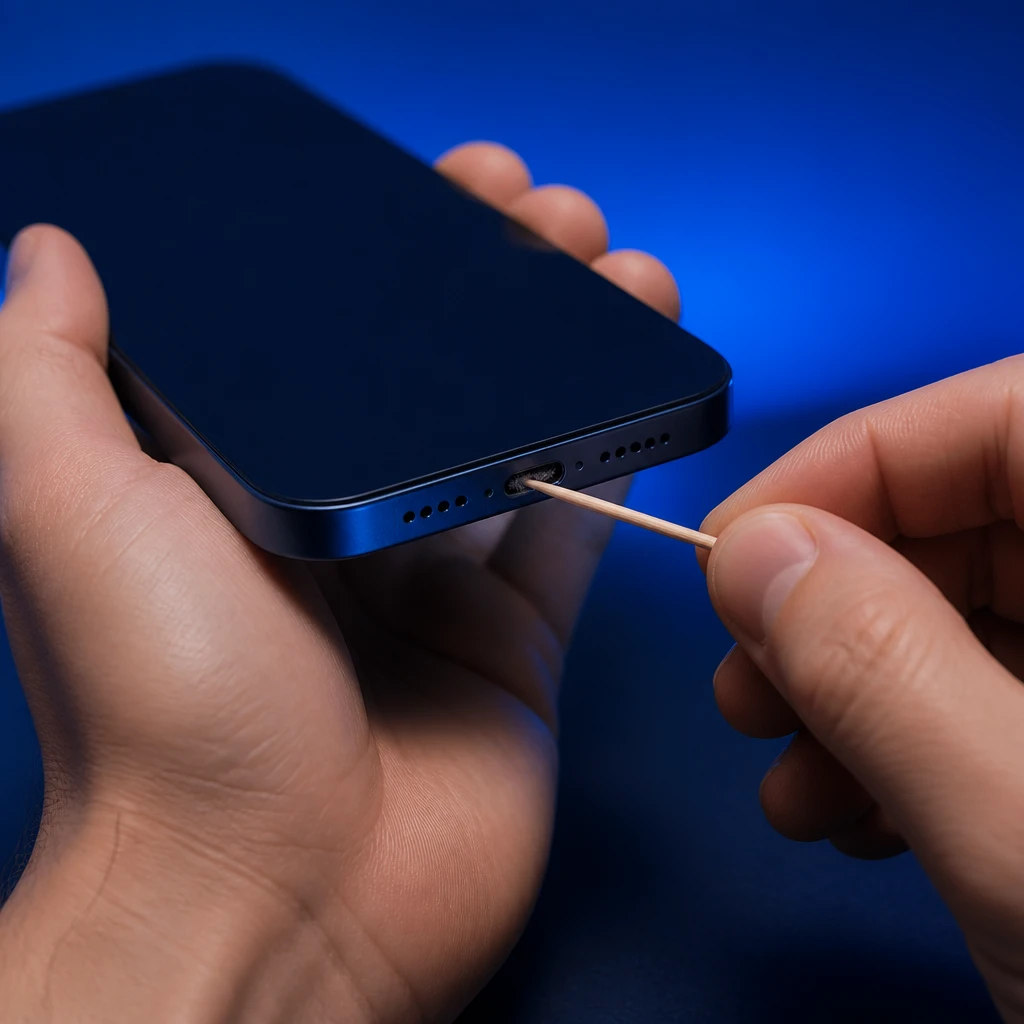
A pocket collects lint, and the port collects it from the pocket, pressed into a hard plug at the bottom by every connection you make. Dust and dirt packed tightly inside a USB-C or Lightning port stop the connector seating fully, and the poor electrical contact that leaves slows charging down or disrupts it altogether.
The tell is a connector that feels shallow, or one that charges only while you hold it pressed in.
What to clean the port with, and what to keep out of it
A wooden toothpick, used gently with the phone powered off, lifts the plug out in one piece. Work from the back of the port toward the opening rather than digging straight down, and stop if you meet resistance.
Clearing the port will not straighten contacts that are already bent, and it does nothing for a worn battery.
Warning: Keep metal out of the port
Do not use a pin, a paperclip or a needle. The contacts inside the port are thin and carry current, and one slip can bend or short them, turning a slow charge into no charge at all.
What your phone is doing while it charges
A battery being filled and drained at once fills slowly. Gaming, streaming video, navigation on a bright screen, or heavy background activity draws substantial power while the phone is plugged in, and that draw works directly against the charge going in.
Why your phone charges slower when it gets hot
Phones often reduce charge speed when they warm up, to manage heat safely. Thermal throttling is the usual name for it, and it is protection working rather than a fault.
A phone charging under a pillow, on a sunlit dashboard, or inside a thick case will slow itself down until it cools.
When the battery itself is worn out
An old battery both holds less charge and accepts current less willingly. If the phone is several years old and charges slowly on every adapter and every cable you try, the battery is the suspect left standing.
Both iOS and Android surface some form of battery health or charging information in settings, though the name and the detail vary by model and by software version, so read it as a hint rather than a verdict.
How to fix a phone that charges slowly
Work through these in order and stop at the one that changes something. Changing several things at once tells you the phone charges faster without telling you why.
- Plug into a wall socket with a fast-charging adapter rather than a laptop, a car socket or a monitor’s USB port.
- Swap the cable for one you know is good, keeping the same adapter, and note how far the battery gets in half an hour.
- Power the phone off and clear the charging port with a wooden toothpick, working from the back of the port outward.
- Close what is running, or switch on airplane mode, and leave the phone alone while it charges.
- Take the case off and move the phone somewhere cool and hard, out of sunlight and off bedding.
- Restart the phone, then install any pending system update, since software updates can sometimes reset charging controls.
- Check the battery health reading in settings if the phone is more than a couple of years old.
Why does my phone charge fast at first and then crawl at the end?
A battery accepts a high current while it is well below full and tapers off as it fills, so the last stretch is slower than the first. Many phones also hold short of full overnight on purpose and finish just before you normally wake up.
Does it matter whether I charge from a laptop or a wall socket?
It matters a lot. A laptop port, a car socket, or a spare USB slot on a monitor delivers far less power than a proper wall adapter, so the same cable and the same phone will charge much more slowly there. Check what is on the other end of the cable before you blame the phone.
When to stop troubleshooting and get it repaired
Some of this is not yours to fix. A connector that wobbles in the port, visible corrosion or bent contacts, a phone that gets hot while doing nothing, or a battery the phone itself flags as degraded all point at hardware.
If other faults arrived at the same time, say the phone restarts by itself or the touch screen stops responding, you are probably looking at one underlying problem rather than three separate ones.
Getting your normal charging speed back
Three things are worth checking before you replace anything: what is feeding the cable, what is inside the port, and what the phone is doing while it charges. If the port is clean and a known fast adapter is on the other end of a good cable and the phone still charges at a crawl, have the port and the battery looked at before you spend money on another accessory.